Last checked:
Activision has not published an official install size for Call of Duty: Modern Warfare 4 on any store listing we could verify ahead of its 23 October 2026 launch. The PC (Windows) release is the only confirmed platform with a listed date so far. This page tracks what is and isn’t announced about download size, preload size and free space, and will be refreshed as the store pages fill in.
What is actually confirmed about the Modern Warfare 4 file size
Nothing numeric, yet. The Steam pre-purchase page and the Battle.net listing are where Activision publishes the “available space” line for PC, and that line is the only figure that counts as official. Until it appears, every gigabyte number you see in a video thumbnail or a forum post is a guess or a leak.
That matters because Call of Duty sizes move a lot between announcement and launch. Publisher-stated free space is a requirement for the installer, not the final footprint on your drive. The number on the box also usually excludes Warzone and any optional high-resolution texture packs, which install through the same launcher.
Here is the current status, platform by platform. “Not announced” means the official listing did not carry a size when we last checked, not that the platform is cancelled.
| Platform | Store listing size | Preload size | Status |
|---|---|---|---|
| PC (Steam) | Not announced | Not announced | Pre-purchase page live, size line pending |
| PC (Battle.net) | Not announced | Not announced | Listing pending size line |
| PlayStation 5 | Not announced | Not announced | Platform not yet confirmed in the data we have |
| Xbox Series X and S | Not announced | Not announced | Platform not yet confirmed in the data we have |
Console versions are expected because every mainline Call of Duty since 2019 has shipped on PlayStation and Xbox, but expectation is not confirmation. Check the PlayStation Store or Xbox Store product page for your region; the size appears in the product details panel once the publisher submits it.
How big previous Call of Duty games were at launch
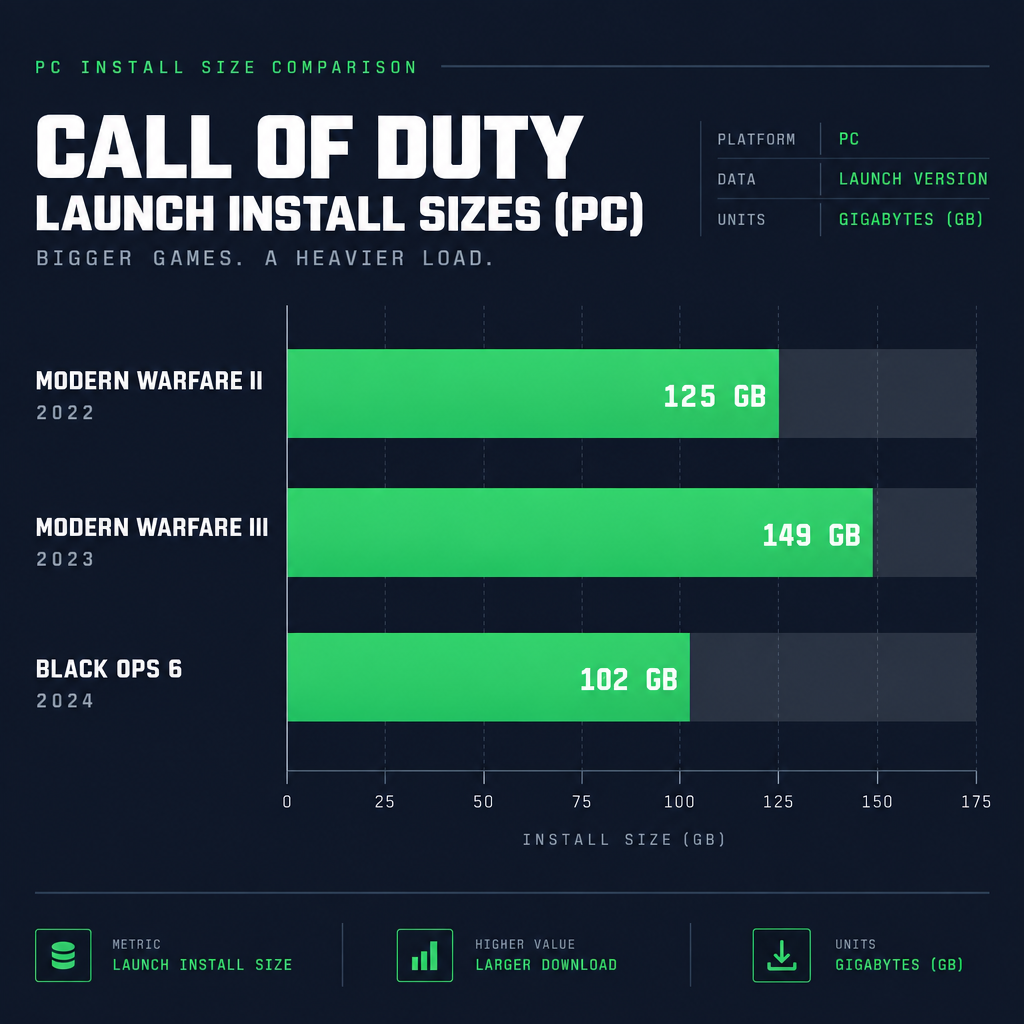
The most useful reference you have right now is the series’ track record, as long as you treat it as context rather than a prediction. These are the “available space” figures Activision listed on Steam for the three most recent premium entries when they launched.
| Game | Launch year | Steam listed free space | Notes |
|---|---|---|---|
| Modern Warfare II | 2022 | 125 GB | First title to launch inside Call of Duty HQ |
| Modern Warfare III | 2023 | 149 GB | Shared the HQ launcher with MWII and Warzone |
| Black Ops 6 | 2024 | 102 GB | Lower listing after Activision trimmed shared assets |
Three things stand out. The listed requirement is not monotonic; Black Ops 6 came in well under its predecessor after Activision reworked how the launcher shares files. The listed figure covers the base game modes and leaves Warzone as a separate, optional component. And the on-disk size after a few months of seasonal updates has historically climbed well past the launch listing.
For comparison with the other big shooter this year, our breakdown of how many gb is battlefield 6 shows a similar pattern: a tidy launch number, then growth through content drops.
Why Call of Duty installs are so large
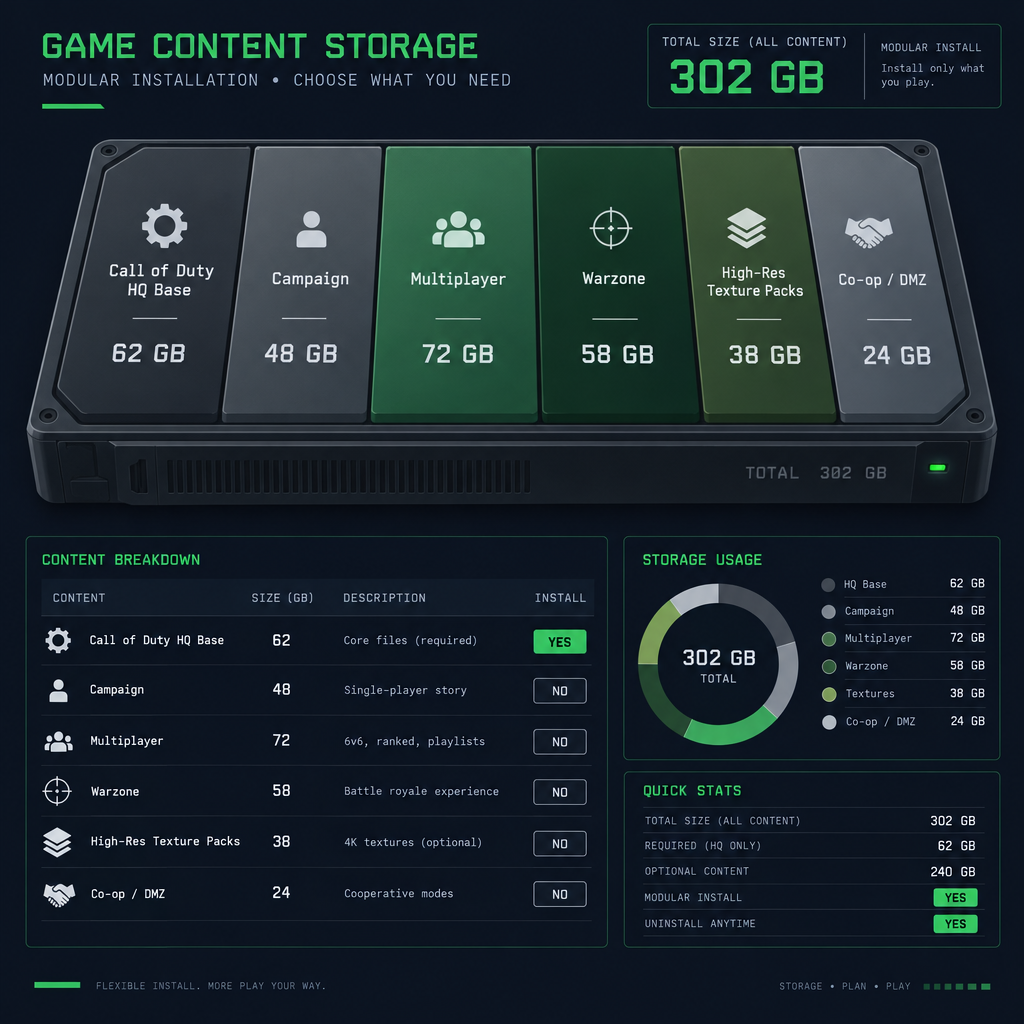
Every Call of Duty since Modern Warfare II has installed through Call of Duty HQ, a single launcher that holds the premium game plus Warzone. When you buy Modern Warfare 4, you are downloading a module that plugs into that shared library, and some of the size on your drive is the shared base rather than MW4 itself.
The upside is that you can remove the parts you don’t play. The downside is that a full install with everything enabled is where the “200 GB” and “300 GB” numbers come from. The components have been consistent across recent entries, so expect a similar structure for MW4.
| Component | What it contains | Removable without deleting the game? |
|---|---|---|
| Call of Duty HQ base | Launcher, shared engine files, shared assets | No |
| Campaign | Single-player missions, cutscenes, campaign-only assets | Yes, once finished |
| Multiplayer | Maps, weapons, modes, Operators | Yes |
| Co-op or Zombies mode | Mode-specific maps and assets | Yes |
| Warzone | Battle royale maps and modes | Yes, it is a separate install |
| High-resolution texture packs | Optional 4K-focused texture tiers | Yes, these are opt-in |
The campaign pack is the easiest win. Finish the story, uninstall that module from the launcher, and you recover a sizeable chunk of space with no effect on your multiplayer progress. MW4 ships with Campaign, Multiplayer and DMZ, which returns with a story, so for this entry the co-op row above corresponds to the DMZ module.
PC: what to prepare before the size is announced
With the PC version carrying the only confirmed launch date, PC players have the clearest to-do list. You cannot know the exact number yet, but you can set yourself up so that the number doesn’t matter when it lands.
Free space versus install size
The “available space” line on Steam is the headroom the installer wants, not the size of the finished install. Steam downloads compressed chunks, unpacks them, and briefly needs room for both. Plan on keeping at least 20 to 30 percent more free space than whatever figure Activision publishes, or Steam will refuse to start the download.
Shader preloading on first boot
Call of Duty on PC compiles shaders for your specific GPU and driver the first time the game runs, and again after major patches and driver updates. The game calls this Shader Preloading and shows a progress bar in the main menu. It adds a small amount to your install folder and a few minutes to your first session, and multiplayer menus can stutter until it finishes.
Good to know
Launch the game on day one, let the shader preloading bar reach 100 percent in the menus, then play. Jumping into a match while it is still compiling is the most common cause of first-day stutter reports on PC.
Anti-cheat and platform security lines
Recent Call of Duty PC listings have carried hardware security lines tied to Activision’s Ricochet anti-cheat, such as TPM 2.0 and Secure Boot. Whether MW4’s listing includes those exact lines is not confirmed yet, so read the full Steam requirements block before launch day. A security requirement you don’t meet stops you from playing after the full download, which is the worst time to discover it.
How to check your PC before download
- Open the Steam pre-purchase page and read the Minimum and Recommended blocks in full.
- Compare the listed free space against your target drive, then add headroom.
- Check the listing for any TPM, Secure Boot or specific Windows version lines.
- Update your GPU driver the week of launch so shader compilation only happens once.
Preload: what we know
Activision has not announced a preload window or a preload size for Modern Warfare 4. The series has consistently offered preloading on PC, PlayStation and Xbox before launch, typically starting a few days ahead of the unlock time, with the exact window announced on the Call of Duty blog and social accounts.
When the window opens, the preload appears automatically in your Steam library, Battle.net launcher, or console download queue if you own the game. There is no separate preload button on consoles; the store starts the download when the publisher flips the switch. On Steam you may need to open your library and click Pre-load if it hasn’t started on its own.
The preload size is often smaller than the final day-one size because a launch-day patch arrives on top. Our guide to the mw4 release time covers the unlock schedule by time zone, which is the moment the preloaded files decrypt and the final patch starts.
How much space to clear, per platform
Without an official number, the honest advice is to clear more than you think you need. Use the previous-entry figures above as a floor, assume Warzone and texture packs on top if you plan to install them, and leave headroom for the first few seasons.
| Platform | Where the game installs | Practical prep |
|---|---|---|
| PC (Steam or Battle.net) | Any drive you choose | Use an SSD; keep 25 percent headroom over the listed figure |
| PlayStation 5 | Internal SSD required to play | Move older titles to USB storage before launch |
| Xbox Series X and S | Internal SSD or Xbox Storage Expansion Card | Series S owners should plan ahead given 512 GB total |
What to clear off your drive first
Start with the obvious offenders. Older Call of Duty modules still sitting inside Call of Duty HQ are the first thing to remove, because they are the single largest shared-launcher items most players carry. Then look for finished single-player games, especially open-world titles with 100 GB plus installs.
Shader caches and old screen captures are smaller wins. On PC, Steam’s shader cache for games you no longer play can be cleared from Steam’s Downloads settings. On PS5 and Xbox, the Media or Captures folder quietly accumulates gigabytes of 4K clips.
If you keep a lot of smaller games around, it helps to know their real footprints. Our pages on fortnite pc storage requirements and how many gb is minecraft cover two titles that often get overestimated when people are deciding what to delete.
What this page will update when launch details land
Several specifics are missing, and all of them will be added the moment Activision posts them on an official channel:
- The Steam and Battle.net “available space” figure for PC.
- The PlayStation Store and Xbox Store listed sizes, if console versions are confirmed.
- The preload window and preload size per platform.
- The day-one patch size, which usually surfaces through platform store data at unlock.
- How large the DMZ mode module is.
- Any hardware security requirements in the PC listing.
Pricing is a separate question and is covered in our call of duty price breakdown across the series, which will also be refreshed once MW4’s editions are confirmed.
FAQ
How to preload MW4?
Preloading has not opened and Activision has not announced the window yet. When it does, own the game on your platform and the download starts automatically in your Steam library, Battle.net launcher, or console queue. On Steam, open your library, select the game, and click Pre-load if it hasn’t begun. Preloaded files stay locked until the official unlock time, when a final patch downloads and the game becomes playable.
Is Call of Duty really 300 GB?
A single premium entry has not been listed at 300 GB on any store page. That figure comes from full Call of Duty HQ installs that stack multiple years of titles, Warzone, and optional high-resolution texture packs in one launcher. Remove the modules you don’t play and the footprint drops sharply. Modern Warfare 4’s own size is not announced yet.
Why is COD MW 200 GB?
The 2019 Modern Warfare became famous for crossing 200 GB on PC because its install bundled the campaign, multiplayer, Spec Ops and, from 2020, Warzone, with no way at the time to remove individual modes. Call of Duty HQ, introduced in 2022, split those into separate modules you can uninstall, which is why recent launch listings have come in lower.
Is there COD Modern Warfare 4?
Yes. Call of Duty: Modern Warfare 4 is the next entry in the rebooted Modern Warfare line, with a confirmed PC (Windows) release on 23 October 2026 and a Steam pre-purchase page live. Install size, preload size and console listings had not been published when this page was last checked, and it will be updated as they appear.
About the Author