Last checked:
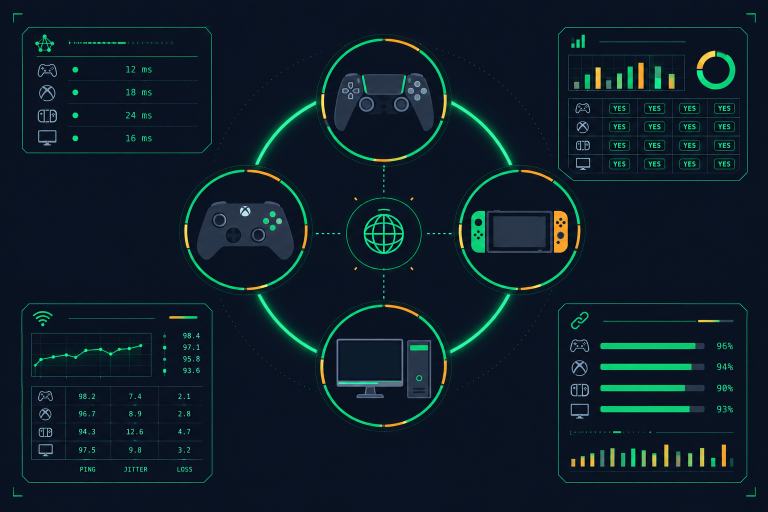
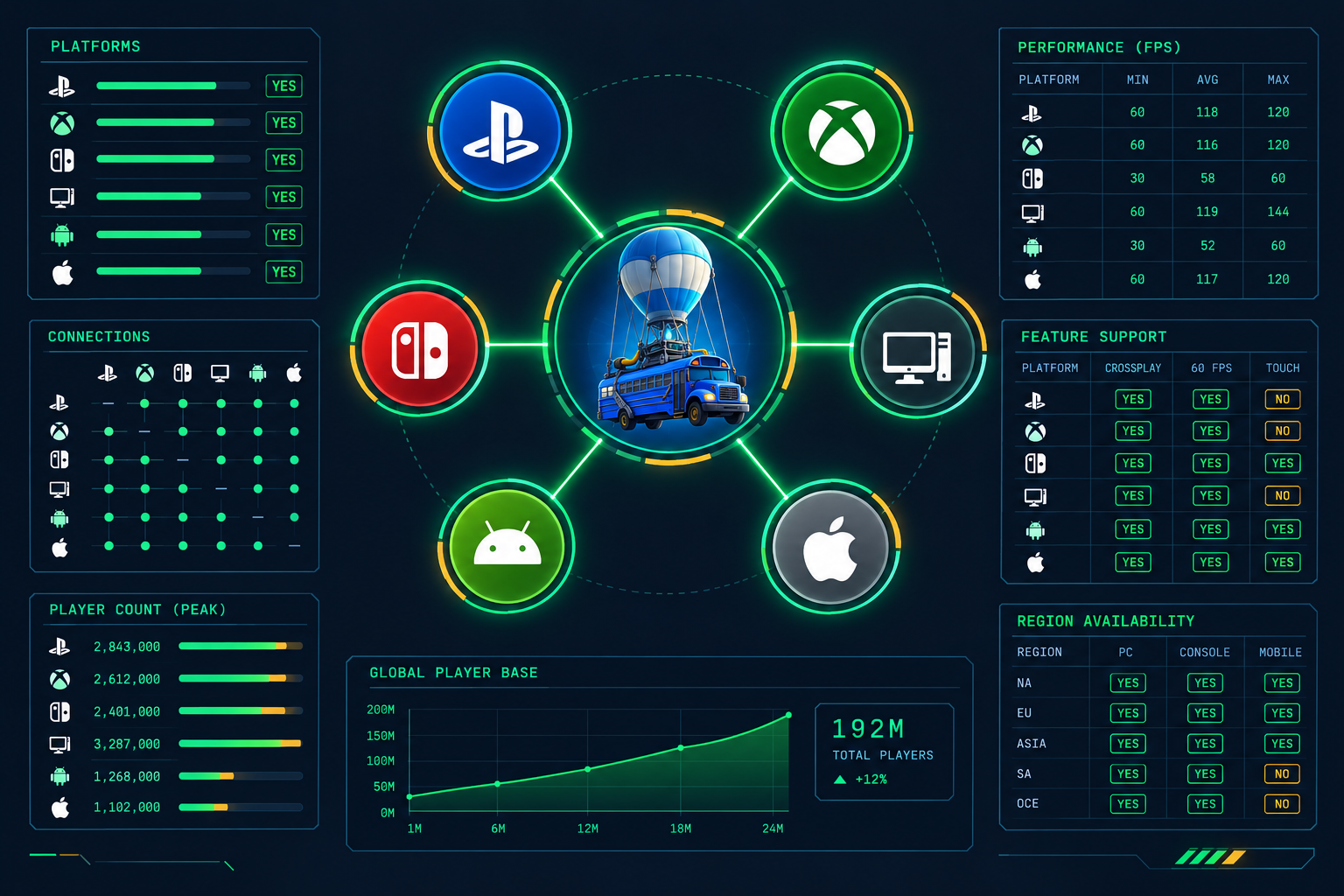
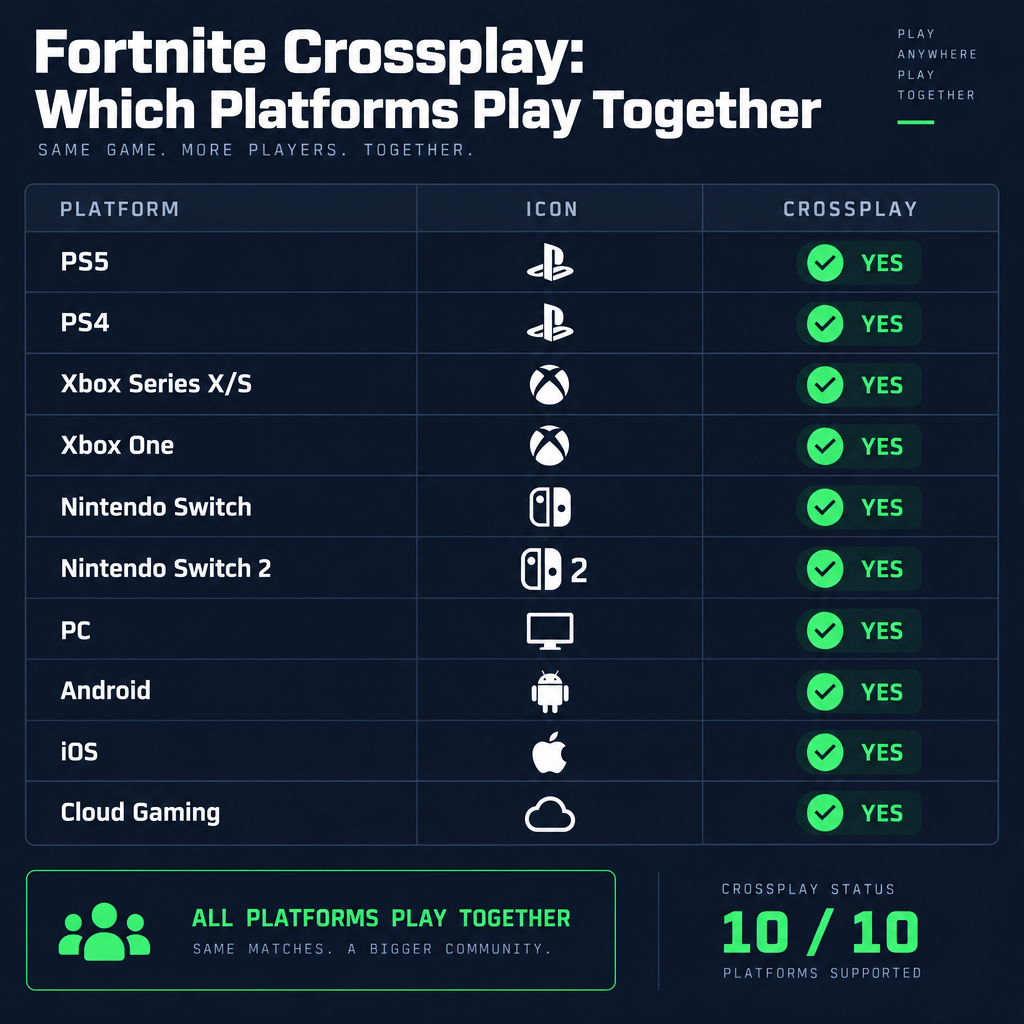
Yes, Fortnite has full crossplay between PlayStation, Xbox, Nintendo Switch, PC, Android, iOS and the major cloud streaming services, and it has worked that way since Sony opened PS4 crossplay in late 2018. Every platform runs the same current build and shares one matchmaking system, so the only real requirement is that each player holds an Epic Games account. Below you’ll find which platforms match together, how lobbies are pooled, what carries over between devices, and the settings that break crossplay when it stops working.
Which platforms play together
Fortnite’s developer, Epic Games, ships one live version of the game to every platform at the same time. There is no separate “mobile Fortnite” or “Switch Fortnite” with its own content; the map, skins, modes and update schedule are identical. That is what makes crossplay possible without compromise.
The table below covers each platform you can play on and how you get the game there. All details are as of October 2026.
| Platform | Crossplay with all others | How you install it | Paid subscription required |
|---|---|---|---|
| PlayStation 5 | Yes | PlayStation Store | No (PS Plus not needed) |
| PlayStation 4 | Yes | PlayStation Store | No |
| Xbox Series X and S | Yes | Microsoft Store | No (Game Pass Core not needed) |
| Xbox One | Yes | Microsoft Store | No |
| Nintendo Switch 2 | Yes | Nintendo eShop | No (NSO not needed) |
| Nintendo Switch | Yes | Nintendo eShop | No |
| PC (Windows) | Yes | Epic Games Launcher only | No |
| Android | Yes | Epic Games Store app | No |
| iOS | Yes | App Store in the US; Epic Games Store app in the EU | No |
| Cloud (Xbox Cloud Gaming, GeForce NOW, Amazon Luna) | Yes | Browser or service app | No for Xbox Cloud Gaming and Luna; GeForce NOW has free and paid tiers |
A few points from that table deserve a sentence each.
Fortnite on PC is distributed through the Epic Games Launcher and nowhere else. If you’re setting a friend up on PC, send them to the launcher rather than Steam, and point them to our “fortnite pc storage requirements” page first, because the install is large and the launcher won’t warn them until the download is already queued.
Nintendo Switch 2 received Fortnite as a launch title in June 2025, and it plays in the same lobbies as the original Switch, consoles and PC. Your progress from Switch 1 appears on Switch 2 as soon as you sign in with the same Epic account.
On mobile, the route to the game depends on where you live. The App Store listing returned in the United States in May 2025 after Epic’s long dispute with Apple. In the European Union you install the Epic Games Store app and get Fortnite through that. On Android, the Epic Games Store app is the main channel worldwide, and Fortnite is not on Google Play as of this writing. Once installed, mobile crossplay works exactly like console crossplay.
Cloud streaming counts as a platform here because it lets devices without a native client, such as Macs, Chromebooks and smart TVs, join the same matches. Xbox Cloud Gaming streams Fortnite free with a Microsoft account and no Game Pass subscription.
How Fortnite pools players in matchmaking
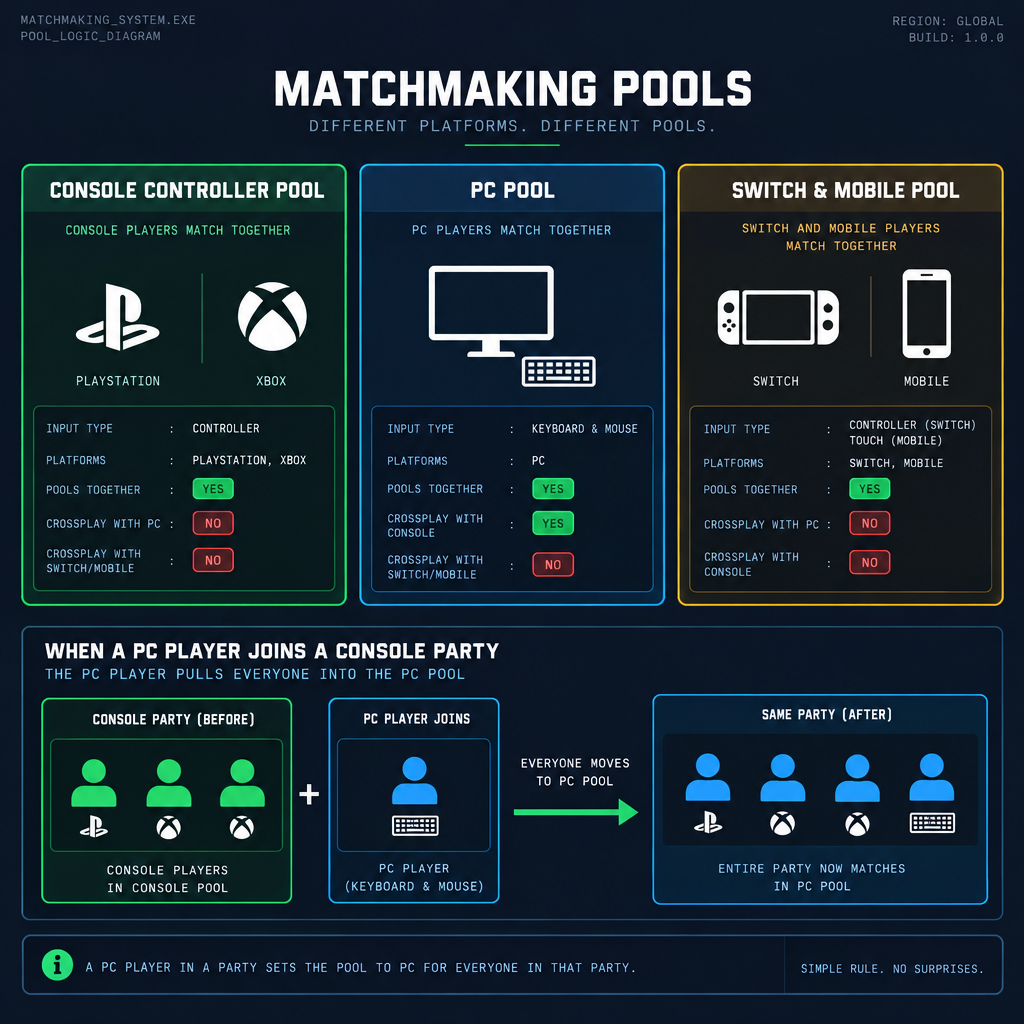
Crossplay being switched on doesn’t mean every match is a random mix of all ten platforms. Epic sorts players into pools based on input device, platform group and party makeup. Knowing this explains why your Switch lobbies feel different from your friend’s PC lobbies.
| Your setup | Default matchmaking pool | What changes if you party up |
|---|---|---|
| PS5, PS4, Xbox Series, Xbox One on a controller | Console controller pool (PlayStation and Xbox together) | Joining a PC player moves the whole party to the PC pool |
| Any console using keyboard and mouse | Keyboard and mouse pool, shared with PC | Already in the PC-equivalent pool |
| PC on any input | PC pool | Console friends who join you get PC lobbies |
| Nintendo Switch and Switch 2 | Switch and mobile pool | Joining a console or PC player moves you to their pool |
| Android and iOS on touch | Mobile pool | Joining a console or PC player moves you to their pool |
| Mobile with a controller | Treated like a controller player | Same as console controller rules |
| Cloud streaming | Pooled by the input you use, not the screen | Same as the underlying input rules |
The rule of thumb is that a party plays in the pool of its most capable member. Two console players and one PC player will all see PC opponents. One mobile player and one PS5 player will see console opponents. Epic does this so nobody can drag a low-input lobby into a mixed party for easy wins.
Input matters more than hardware. Plug a mouse into an Xbox Series X and Fortnite treats you as a keyboard and mouse player for that session, which puts you against PC players even when you queue solo. Switch back to a controller and you drop back into the console pool.
Ranked modes use the same logic layered on top of rank. A mixed party is placed by the highest rank in the group and by the strictest input pool, so a Gold-ranked Switch player partied with a Diamond PC player will face Diamond-level PC opposition.
Crossplay, cross-progression and account linking: three different things
These terms get mixed up constantly, and the confusion is behind most “crossplay isn’t working” complaints. Each one depends on the one before it.
Account linking is the foundation. Your PlayStation Network ID, Xbox gamertag or Nintendo Account gets attached to one Epic Games account. Without that link, you’re playing on a temporary account that exists only on that console.
Crossplay is the ability to be in a match with players on other platforms. In Fortnite it’s always on by default and doesn’t technically require you to link anything beyond having an Epic account, which the game creates for you on first launch.
Cross-progression is your locker, Battle Pass, V-Bucks, stats, friends and settings following you between devices. This only works if every device signs into the same linked Epic account.
| Item | Carries across platforms | Notes, as of October 2026 |
|---|---|---|
| Skins, emotes, pickaxes, gliders, wraps | Yes | Includes collab items such as Marvel and Star Wars sets |
| Battle Pass progress and level | Yes | Same pass on every device |
| Account level and XP | Yes | |
| Ranked rank | Yes | One rank per mode per account |
| V-Bucks from the Battle Pass or Crew | Yes | Shared wallet |
| V-Bucks bought on PlayStation, Xbox, PC, Android or iOS | Yes | Shared wallet |
| V-Bucks bought on Nintendo Switch | No | Spendable only on Switch and Switch 2 |
| Save the World progress | Partly | Save the World is not available on Switch or mobile |
| Friends list | Yes | Epic friends appear everywhere; console friends appear as suggestions once linked |
| Settings and keybinds | Mostly | Platform-specific settings like graphics presets stay local |
The Nintendo exception is the one that catches people. V-Bucks you buy through the eShop are placed in a separate wallet that can only be spent while playing on a Switch family console. V-Bucks you buy anywhere else, or earn through the Battle Pass, land in the shared wallet and can be spent on Switch. If you plan to buy currency and play on more than one device, buy it on PC, mobile, PlayStation or Xbox, and the balance shows up on all of them.
Save the World, the paid PvE mode, is a different case. It runs on PlayStation, Xbox and PC, and your founder or purchased access carries between those. It has never shipped on Switch or mobile, so there’s nothing to carry over there.
How to link your console account to Epic Games
If you’ve been playing on a PS5 or Xbox for a while without ever typing in an Epic email, you’re almost certainly on what Epic calls a headless account. It was created automatically the first time you launched the game, and it holds everything you’ve unlocked. Linking it properly is how you keep that progress when you add a second platform.
The safest order of operations is to start from the platform where your progress lives and claim that account first. Do not create a fresh Epic account on a PC or phone and then try to link your console to it; the console ID will already be attached to the headless account, and you’ll get an error saying it’s in use.
How to link a console account
- On the console where your progress lives, open Fortnite and go to Settings, then the Account and Privacy tab.
- Choose the option to link or connect your account, which opens a prompt with a short code and a web address.
- On a phone or PC, go to the address shown, sign in with the console account’s email when asked, and enter the code.
- If you’ve never set an email, you’ll be prompted to add one and a password. This turns the headless account into a full Epic account.
- Repeat on any other console. Each new platform asks you to sign in with that same Epic email during first launch.
A few rules apply to linking, as of October 2026. One Epic account can hold one PlayStation Network account, one Xbox account and one Nintendo Account at a time. You can also attach Steam, Google, Apple and social logins, but those are sign-in methods rather than game platforms. Epic imposes a cooldown before a console account that’s been unlinked can be attached to a different Epic account, so treat linking as a long-term decision rather than something to shuffle between family members.
Epic retired its account merge tool in 2019. If you built progress on two separate Epic accounts on two consoles, there’s no way to combine them now. Pick the one with the locker you care about, link your other console to it, and accept that the second account’s items stay where they are.
You can check what’s connected at any time from the Connections tab in your Epic account settings on the web. The same page lets you see whether an email is verified, which is required before you can claim free rewards or enable two-factor authentication.
How to turn crossplay on or off
Fortnite ships with crossplay on. Most people reading this want it to stay that way and are troubleshooting why it isn’t working, which is covered further down. If you specifically want to limit who you match with, there are two places a setting can live: inside the game, and at the console system level.
Inside Fortnite, the relevant option is in the Account and Privacy tab of the settings menu. Setting the cross-platform option to off restricts your parties to players on your own platform family and places you in your platform’s own queue. Expect longer waits, because you’re excluding the majority of the player base.
On Xbox, there’s a system-wide privacy setting that overrides the game. If it’s set to block, Fortnite can’t match you with PlayStation, Switch, PC or mobile players no matter what you pick in-game.
Allow cross-network play on Xbox
- Press the Xbox button, go to Profile and system, then Settings.
- Open Account, then Privacy and online safety, then Xbox privacy.
- Choose View details and customize, then Communication and multiplayer.
- Set “You can join cross-network play” to Allow.
- Restart Fortnite so it picks up the change.
Child accounts on Xbox inherit this setting from the family organiser, so if a parent set up the account, the toggle is in the parent’s Family settings rather than the child’s profile. The same goes for “You can communicate outside of Xbox with voice and text,” which controls whether in-game voice works with players on other platforms.
PlayStation doesn’t offer a global crossplay switch on PS5 or PS4. Fortnite controls it entirely through the in-game setting. If you want to block it on a child’s PlayStation account, the Epic parental controls PIN is the right tool, since it can lock the setting so it can’t be flipped back.
Nintendo Switch and Switch 2 have no system-level crossplay toggle either. Nintendo’s parental controls app can restrict communication features, which affects voice chat, but it won’t stop Fortnite matching your child with players on other platforms. Again, the in-game setting plus Epic’s PIN is the answer. If you’re weighing up what’s appropriate, our “fortnite age rating” page explains what the ESRB and PEGI ratings cover and what the parental controls can and can’t lock down.
PC and mobile have no console-style overrides. The in-game setting is the only switch.
How to add friends across platforms
Fortnite’s friends system runs on Epic, not on PlayStation Network, Xbox Live or Nintendo’s friend codes. To play with someone on a different platform, you need their Epic display name, and they need to accept a request from yours.
Open the sidebar in the lobby, go to the Friends tab, pick Add Friends and type the display name. The request shows up for them on any platform they’re signed into, including the Epic Games Launcher and the Epic mobile app, even if they’re not in the game at the time. Once accepted, you’ll see each other online across every device and can send party invites directly.
Epic display names are different from console names, and this trips up a lot of people. Your PlayStation ID might be something you picked in 2014, while your Epic display name was chosen when you claimed your Epic account, and the two don’t need to match. In Fortnite, the name floating over your head is the Epic display name. You can change it once every two weeks from your Epic account settings on the web.
Friends from your console network appear automatically as suggestions once that console account is linked. If your Xbox friend also plays Fortnite and has linked their gamertag, they’ll show in the suggested list with their Epic display name next to the gamertag, which is the quickest way to find them.
Party invites and voice chat work across all platforms through Epic’s own systems. A PS5 player, a Switch 2 player and an iPhone player can be in one party and talk to each other without any console party involved. Platform parties, such as a PlayStation party or Xbox party, only connect players on that network, so stick to the in-game voice when your group is mixed. Voice chat needs to be enabled in the Audio tab of settings, and on console it also depends on the system privacy settings described above.
Platform limits and partial compatibility
Crossplay is complete for everyone on the current build, but some devices and situations fall outside it.
Mac. The native Mac client stopped receiving updates during the Apple dispute in 2020 and does not match with players on the live version. Mac users who want to play with friends use GeForce NOW or Xbox Cloud Gaming in a browser. Both services stream the current build and support crossplay normally.
Google Play. Fortnite is not on Google Play, so Android players install the Epic Games Store app and get Fortnite from there. Installing from outside the Play Store requires granting an install permission the first time, which Android walks you through. Samsung users should note that Fortnite also left the Galaxy Store in July 2024, so the Epic app is the route on Samsung phones too.
iOS in Australia. Fortnite returned to the App Store in every country except Australia on May 19, 2026, and the Epic Games Store app on iOS is available in the EU, Japan and Brazil. Players in Australia use cloud streaming in Safari. Epic has said it wants to expand native availability as regional app store laws change, but no further regions are confirmed.
Performance tiers. Everyone shares the same matches, but frame rates differ. PS5, Xbox Series X and Series S offer a 120 fps mode. Switch 2 targets 60 fps. Switch 1 and base mobile phones run lower. This doesn’t affect whether you can play together, but it does affect how a party feels when a Switch 1 player is matched into a PC pool because a friend on PC invited them.
Save the World. Not on Switch or mobile, and not on cloud services that don’t support purchases. Battle Royale, Zero Build, Reload, Festival, LEGO Fortnite, Rocket Racing and creator-made islands are available on every platform.
Creative islands with platform restrictions. A small number of creator islands require features that aren’t available on mobile, such as higher memory budgets. If a party leader picks one, players on unsupported devices will be told they can’t join. This is per island, not a crossplay limitation.
Which platform should you play on with cross-platform friends
The comparison below assumes your main goal is playing with a mixed group of friends and keeping one account across devices. Everything else being equal, the platform you already own wins, since the game and your progress are free to move. These are the trade-offs if you have a choice.
| Platform | Strengths for cross-platform play | Weaknesses for cross-platform play |
|---|---|---|
| PS5 or Xbox Series X | 120 fps mode, console controller pool by default, easy voice setup | Partying with PC friends puts you in PC lobbies at a controller disadvantage |
| Xbox Series S | Cheapest 120 fps route, same pool rules as Series X | Lower resolution in performance modes |
| PS4 or Xbox One | Same lobbies as current consoles, full cross-progression | Capped at 60 fps, longer load times on base models |
| Nintendo Switch 2 | Portable, 60 fps, shares the Switch and mobile pool for easier solo matches | eShop V-Bucks locked to Nintendo, no Save the World |
| Nintendo Switch | Cheapest console entry, same account system | Lowest console performance, struggles when pulled into PC lobbies |
| PC via Epic Games Launcher | Highest frame rates, keyboard and mouse, first to get optional graphics features | Largest install, you’re always in the PC pool, console friends who join you face PC players |
| Android or iOS | Free, plays with everyone, touch or controller | Smallest screen, touch players pulled into console pools when partied, regional install hurdles |
| Cloud streaming | Works on Mac, Chromebook, TVs and low-end PCs, no install | Latency added on top of the game’s own netcode, GeForce NOW free tier queues and session limits |
Here’s the verdict for the common situations.
If your group is mostly on consoles, a PS5 or Xbox Series console is the right pick. You stay in the controller pool when you play together, the 120 fps mode is a real advantage, and voice works through the game with no extra setup.
If your group includes a PC player who always hosts, you’ll be in PC lobbies regardless of what you buy. In that case, PC is the honest choice, and a console player should at least consider a keyboard and mouse to remove the input gap.
If you want to play on the sofa and on the train, Switch 2 is the only portable that stays in a gentler default pool. Buy V-Bucks elsewhere so they aren’t locked to Nintendo.
If you own a Mac or want to try before downloading anything, Xbox Cloud Gaming costs nothing and lets you join the same matches today. Move to a native platform later and your account comes with you.
What crossplay costs on each platform
Fortnite is free to play everywhere, and crossplay adds no cost. None of the console makers require their online subscription for free-to-play titles, which has been true for PlayStation Plus, Xbox Live Gold (now Game Pass Core) and Nintendo Switch Online since 2021 or earlier. The only money you might spend is on cosmetics, the Battle Pass or a streaming tier.
| Cost item | Price, US store, as of October 2026 | Platform notes |
|---|---|---|
| Fortnite download | Free | All platforms |
| Online subscription for crossplay | Not required | PS Plus, Game Pass Core and NSO are all optional |
| 1,000 V-Bucks | $8.99 | Same price across stores; Switch purchases stay on Switch |
| Battle Pass | 950 V-Bucks | Has long held at this price; confirm in the pass tab each season |
| Fortnite Crew | $11.99 per month | Includes the pass and 1,000 V-Bucks; cancel from the store you bought it on |
| Xbox Cloud Gaming for Fortnite | Free | Microsoft account only, no Game Pass |
| Amazon Luna for Fortnite | Free | Amazon account, no Luna subscription |
| GeForce NOW | Free tier, or paid Performance and Ultimate tiers | Paid tiers remove queues and raise frame rate and session caps |
Prices outside the United States vary by region and currency. Mobile prices in the US App Store match the other platforms since Epic handles payment through its own system where regulations allow.
One cost-related detail that affects crossplay planning: Fortnite Crew and the Battle Pass unlock on your Epic account, so buying on PlayStation and playing on PC works. The V-Bucks that come with Crew go to the shared wallet except when Crew is purchased on Nintendo, in which case they follow the Nintendo wallet rule.
Why crossplay isn’t working and how to fix it
When a group can’t get into the same match, the cause is almost always one of the items below. Work through them in order.
Different Epic accounts than you think. Two siblings on two consoles often end up with two headless accounts, neither of which is the one a parent linked on the web. Open Settings, then Account and Privacy, and read the display name and email shown there on each device. If they don’t match what you expected, that’s the problem.
Xbox cross-network play set to Block. Covered above. This single setting is responsible for the majority of “Xbox can’t play with PS5” reports, especially on child accounts where the default is more restrictive.
In-game cross-platform setting turned off. Check the Account and Privacy tab on the console that can’t join. Someone may have flipped it while poking around in settings.
Epic parental controls PIN. If a PIN is set, several social features can be locked, including who can send friend requests and whether voice works. The owner of the PIN can review these from the Parental Controls section of the settings menu.
Version mismatch. Everyone must be on the same build. Consoles sometimes sit on the previous version if auto-update is off or the console was in a power state that skipped it. The lobby will usually tell you an update is required, but on cloud services and older consoles it can simply fail to join.
Friend request sent to a console name. If you searched for a PlayStation ID in the Epic friend finder, it won’t find anyone unless that player’s Epic display name happens to be identical. Ask for the Epic display name.
Region mismatch in matchmaking settings. Both players can be on different matchmaking regions if one chose a region manually. Set both to Auto in the Game settings, or pick the same region.
Party leader on an unsupported island. If the leader selects a creator island with platform restrictions, mobile or Switch players will be refused. Switch to a standard mode and try again.
Good to know
Before troubleshooting anything else, have each person read out the Epic display name shown in the top-left of the Fortnite lobby. Nine times out of ten the issue is two different accounts, and nothing in the console settings will fix that.
A short history of how Fortnite got here
Fortnite is the reason crossplay is normal on consoles today. When Battle Royale launched in 2017, Epic enabled cross-platform matches between PC, Xbox One and mobile early on, and Nintendo Switch joined the same pool on the day it launched in June 2018. Sony held out. PS4 players couldn’t join friends on Xbox or Switch, and an Epic account that had ever signed in on a PS4 was blocked from being used on a Switch, which caused a public backlash during the Switch launch window.
Sony relented in September 2018 with a crossplay beta for Fortnite, the first game it allowed to match PS4 players with Xbox and Switch. Full, general crossplay support on PlayStation followed in October 2019. Every platform launch since then, including PS5 and Xbox Series in 2020, Xbox Cloud Gaming in 2022, iOS in the EU in 2024, and Switch 2 and the US App Store in 2025, has joined the existing pool on day one.
That history is why Fortnite’s crossplay has no asterisks. The game was designed around one account system from the start, and the platform holders adjusted their policies to fit it rather than the other way round.
FAQ
Can I cross play Fortnite with Xbox and PS5?
Yes. Xbox One, Xbox Series X and S, PS4 and PS5 all match together, and controller players on both are placed in the same console pool by default. Each player needs an Epic account, and the Xbox player must have “You can join cross-network play” set to Allow in their Xbox privacy settings. Add each other using Epic display names rather than gamertags or PSN IDs.
Can Fortnite do cross-platform?
Yes, fully. Fortnite supports crossplay across every platform it runs on, including PlayStation, Xbox, Nintendo Switch and Switch 2, PC, Android, iOS and cloud streaming services. It also supports cross-progression, so your locker, Battle Pass, rank and most V-Bucks follow one Epic account from device to device. The main exception is V-Bucks bought on the Nintendo eShop, which stay on Nintendo hardware.
Why isn’t crossplay working in Fortnite?
The most common causes are two players signed into different Epic accounts without realising it, the Xbox cross-network play setting being set to Block, the in-game cross-platform option being switched off, or one player running an older version of the game. Check the display name in the lobby on each device first, then the Xbox privacy settings, then the Account and Privacy tab inside Fortnite. If a friend request fails, make sure you’re searching the Epic display name and not a console name.
Can PC and Xbox Fortnite play together?
Yes. PC and Xbox players can party up, talk through in-game voice and play every mode together. Be aware that the whole party is placed in the PC matchmaking pool when any member is on PC, so the Xbox player will face PC opponents, most of them on keyboard and mouse. If that’s a problem, the PC player can switch to a controller, which doesn’t change the pool, or the Xbox player can plug in a keyboard and mouse to close the input gap.
Does crossplay cost anything on Fortnite?
No. The game is free on every platform and none of the console subscriptions are required for online play in free-to-play titles. Cloud streaming through Xbox Cloud Gaming and Amazon Luna is free with an account; GeForce NOW has a free tier with queues and paid tiers that remove them. The only spending is optional cosmetics, the Battle Pass or Fortnite Crew, and those unlock on your Epic account across all platforms.
Can Nintendo Switch play Fortnite with PlayStation and Xbox?
Yes. Switch and Switch 2 match with every other platform. Solo, Switch players sit in a pool with mobile players by default, but joining a PlayStation, Xbox or PC friend moves the party into that friend’s pool. Nintendo Switch Online is not needed. Keep in mind that V-Bucks bought through the eShop can only be spent on Switch hardware, so buy currency on another platform if you play on more than one.
About the Author